Week 0: Computational Thinking and Scratch
Week 0 introduces computer science as problem-solving. It explains how computers represent information, compares algorithms, introduces pseudocode, and uses Scratch to make the basic building blocks of programming visible.
Learning objectives
By the end of this week, you should be able to:
- explain how binary represents numbers and other kinds of information;
- distinguish between ASCII and Unicode;
- compare linear search with a divide-and-conquer approach;
- express an algorithm using pseudocode; and
- build a Scratch program using functions, variables, conditions, loops, and events.
Computer science and problem-solving
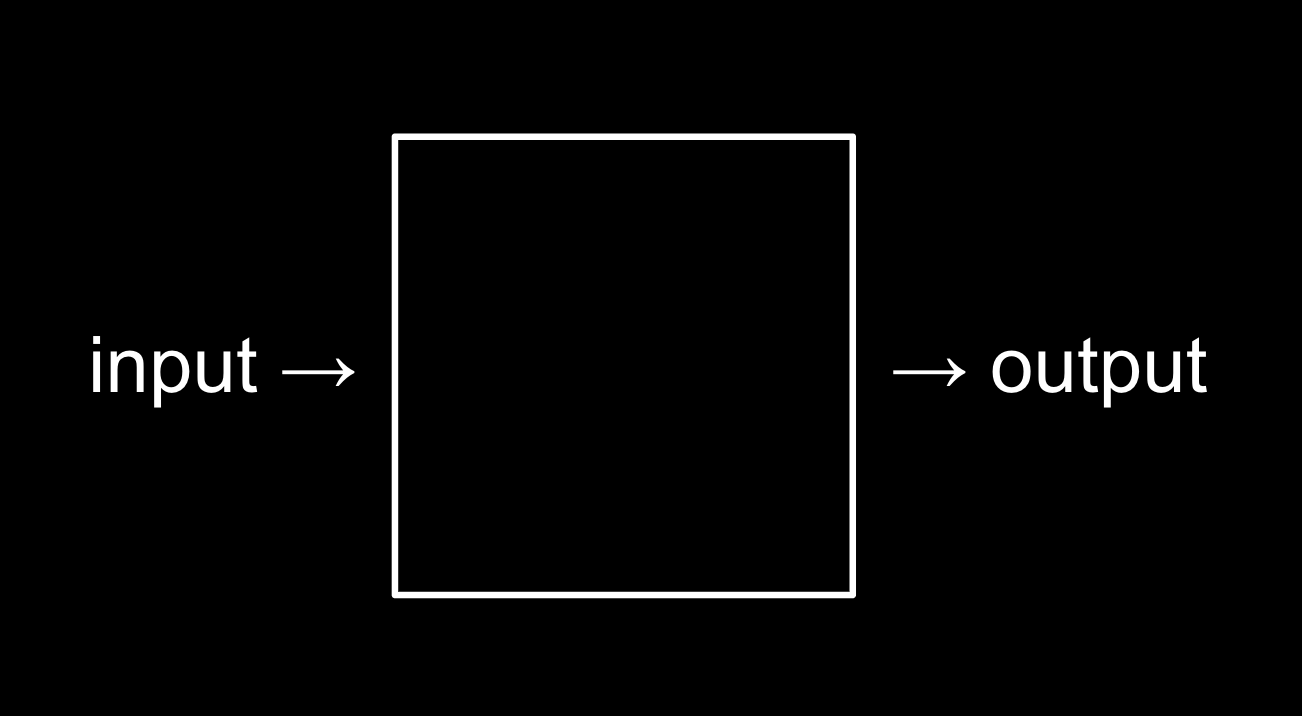
Essentially, computer programming is about taking some input and creating some output - thus solving a problem. What happens in between the input and output, what we could call a black box, is the focus of this course.
For example, we may need to take attendance for a class. We could use a system called unary (also called base-1) to count one finger at a time.
Computers today count using a system called binary (also called base-2). It’s from the term binary digit that we get a familiar term called bit. A bit is a zero or one: on or off.
Computers only speak in terms of zeros and ones. Zeros represent off. Ones represent on. Computers are millions, and perhaps billions, of transistors that are being turned on and off.
If you imagine using a light bulb, a single bulb can only count from zero to one.
However, if you were to have three light bulbs, there are more options open to you!
Inside your devices, such as your iPhone or computer, there are millions of metaphorical light bulbs called transistors that enable the activities conducted on these devices one may take for granted each day.
As a heuristic, we could imagine that the following values represent each possible place in our binary digit:
4 2 1
Using three light bulbs, the following could represent zero:
4 2 1
0 0 0
Similarly, the following would represent one:
4 2 1
0 0 1
By this logic, we could propose that the following equals two:
4 2 1
0 1 0
Extending this logic further, the following represents three:
4 2 1
0 1 1
Four would appear as:
4 2 1
1 0 0
We could, in fact, using only three light bulbs count as high as seven!
4 2 1
1 1 1
Computers use base-2 to count. This can be pictured as follows:
2^2  2^1  2^0
4    2    1
Therefore, you could say that it would require three bits (the four’s place, the two’s place, and the one’s place) to represent a number as high as seven.
Similarly, to count a number as high as eight, values would be represented as follows:
8 4 2 1
1 0 0 0
| 128 | 64 | 32 | 16 | 8 | 4 | 2 | 1 |
|---|---|---|---|---|---|---|---|
| 0 | 0 | 0 | 0 | 0 | 0 | 0 | 0 |
ASCII
Just as numbers are binary patterns of ones and zeros, letters are represented using ones and zeros, too!
Since there is an overlap between the ones and zeros that represent numbers and letters, the ASCII standard was created to map specific letters to specific numbers.
For example, the letter A was decided to map to the number 65. 01000001 represents the number 65 in binary. You can visualize this as follows:
| 128 | 64 | 32 | 16 | 8 | 4 | 2 | 1 |
|---|---|---|---|---|---|---|---|
| 0 | 1 | 0 | 0 | 0 | 0 | 0 | 1 |
If you received a text message, the binary under that message might represent the numbers 72, 73, and 33. Mapping these out to ASCII, your message would look as follows:
H   I   !
72  73  33
Thank goodness for standards like ASCII that allow us to agree upon these values! Here is an expanded map of ASCII values:
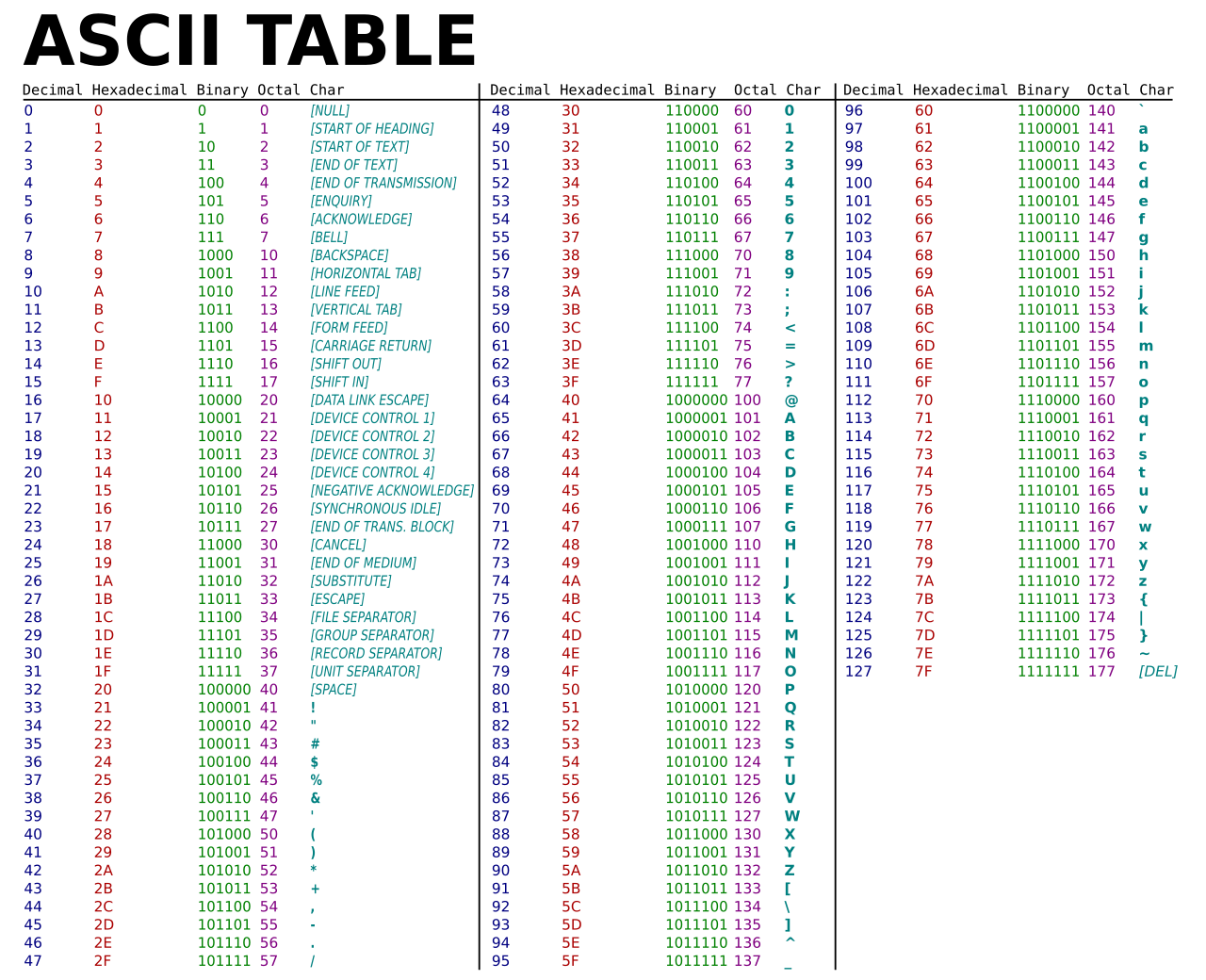
If you wish, you can learn more about ASCII.
If each character is stored in exactly one 8-bit byte, you can encode at most 256 distinct character codes. ASCII uses only 128 of those (0-127).
Unicode
As time has rolled on, there are more and more ways to communicate via text.
Since there were not enough digits in binary to represent all the various characters that could be represented by humans, the Unicode standard expanded the number of bits that can be transmitted and understood by computers. Unicode includes not only special characters, but emoji as well.
There are emoji that you probably use every day. The following may look familiar to you:
😀 😃 😄 😁 😆 😅 😂 🙂 🙃 😉 😊 😇 😍 😘 😗 😙 😚 😋 😛 😜 😝 🤑 🤓 😎 🤗 😏 😶 😐 😑 😒 🙄 😬 😕 ☹️ 😟 😮 😯 😲 😳 😦 😧 😨
While the pattern of zeros and ones is standardized within Unicode, each device manufacturer may display each emoji slightly differently than another manufacturer.
More and more features are being added to the Unicode standard to represent further characters and emoji.
If you wish, you can learn more about Unicode.
If you wish, you can learn more about emoji.
RGB
Zeros and ones can be used to represent color.
Red, green, and blue (called RGB) are a combination of three numbers.
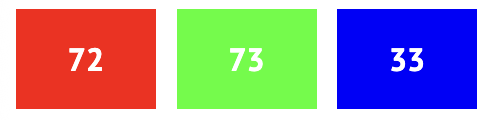
Taking our previously used 72, 73, and 33, which said HI! via text, would be interpreted by image readers as a shade of olive-yellow. The red value would be 72, the green value would be 73, and the blue would be 33.
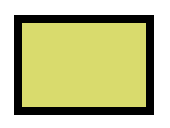
The three bytes required to represent various colors of red, blue, and green (or RGB) make up each pixel (or dot) of color in any digital image. Images are simply collections of RGB values.
Zeros and ones can be used to represent images, videos, and music!
Videos are sequences of many images that are stored together, just like a flipbook.
Music can be represented similarly using various combinations of bytes.
Algorithms
Problem-solving is central to computer science and computer programming. An algorithm is a step-by-step set of instructions to solve a problem. Imagine the basic problem of trying to locate a single name in a phone book. How might one go about this? One approach could be to simply read from page one to the next to the next until reaching the last page. Another approach could be to search two pages at a time. A final and perhaps better approach could be to go to the middle of the phone book and ask, “Is the name I am looking for to the left or to the right?” Then, repeat this process, cutting the problem in half and half and half. Each of these approaches could be called algorithms. The speed of each of these algorithms can be pictured as follows in what is called big-O notation:
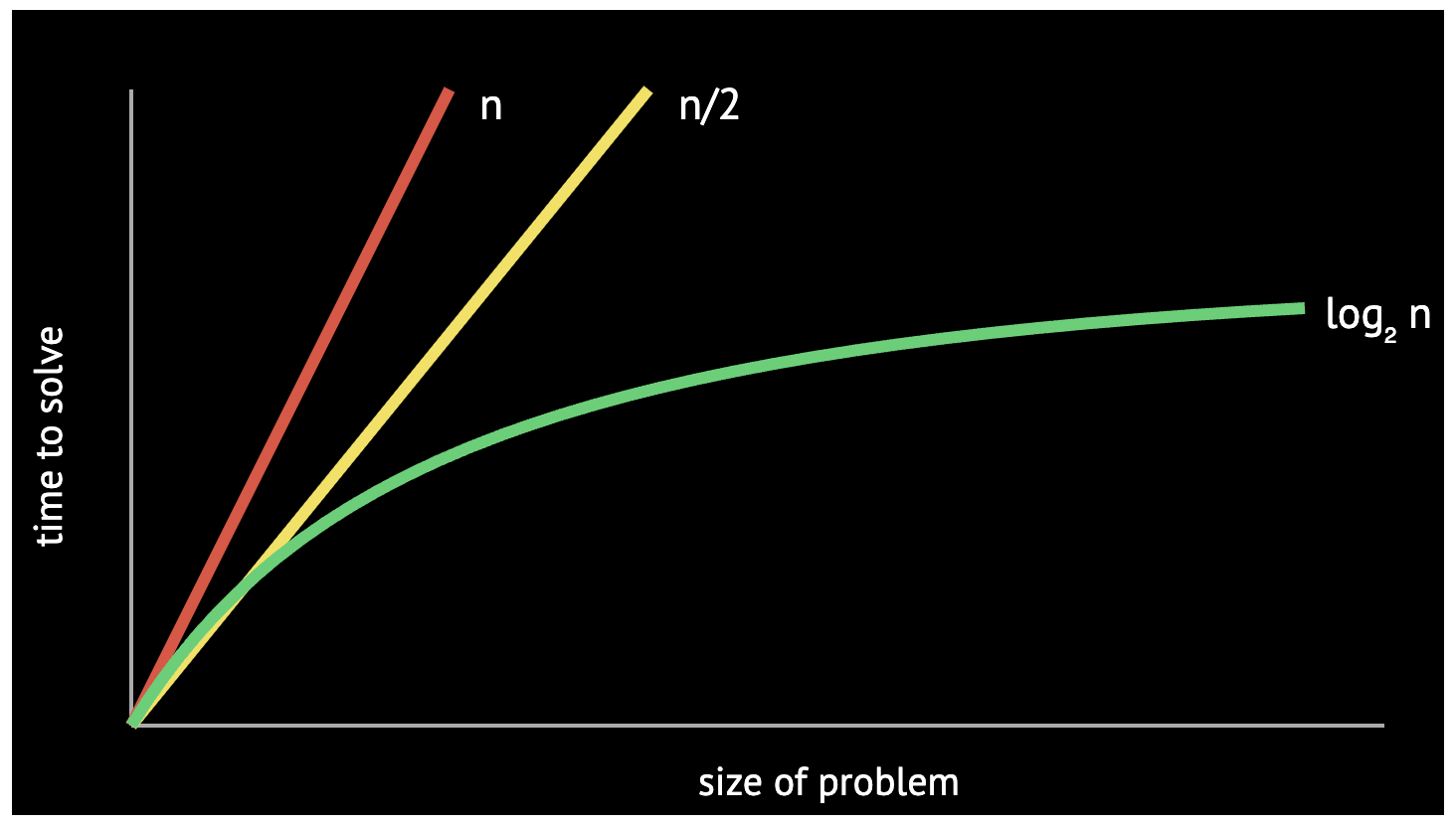
The first algorithm, highlighted in red, has a running time of O(n) because if there are 100 names in the phone book, it could take up to 100 tries to find the correct name.
The second algorithm checks about n / 2 pages, but its growth class is still O(n) because Big-O notation ignores constant factors.
The final algorithm has a running time of O(log₂ n): doubling the size of the phone book adds only one more step.
Programmers translate text-based, human instructions into code to solve problems.
Pseudocode
Pseudocode is human-readable instructions that often describe the steps of an algorithm. The ability to create pseudocode is central to one’s success in both this class and in computer programming. For example, considering the third algorithm above, we could compose pseudocode as follows:
1  Pick up phone book
2  Open to middle of phone book
3  Look at page
4  If person is on page
5      Call person
6  Else if person is earlier in book
7      Open to middle of left half of book
8      Go back to line 3
9  Else if person is later in book
10     Open to middle of right half of book
11     Go back to line 3
12 Else
13     Quit
Pseudocoding is such an important skill for at least two reasons. First, when you pseudocode before you create formal code, it allows you to think through the logic of your problem in advance. Second, when you pseudocode, you can later provide this information to others that are seeking to understand your coding decisions and how your code works. Notice that the language within our pseudocode has some unique features. First, some of these lines begin with verbs like pick up, open, look at. Later, we will call these functions. Second, notice that some lines include statements like if or else if. These are called conditionals. Third, notice how there are expressions that can be stated as true or false, such as “person is earlier in the book.” We call these boolean expressions. Finally, notice how there are statements like “go back to line 3.” We call these loops. These building blocks are the fundamentals of programming. In the context of Scratch, which is discussed below, we will use each of the above basic building blocks of programming.
What comes next
Scratch allows us to focus on programming ideas without punctuation and syntax. Later weeks move to C, Python, algorithms, data structures, SQL, and web development. The languages will change, but functions, conditions, Boolean expressions, loops, variables, inputs, and outputs will continue to appear.
The Scratch environment
Scratch is a visual programming language developed by MIT. Its editor contains:
- a palette of available blocks;
- a programming area where blocks are assembled;
- a stage where the program runs;
- sprites that perform actions on the stage.
The Scratch stage uses coordinates. Its center is (0, 0). Positive x values
move right, negative x values move left, positive y values move up, and
negative y values move down.
Hello, world
A Scratch program can begin when the green flag is clicked:
when green flag clicked
say "hello, world"
The text hello, world is the input to the say function. The visible speech
bubble is the function's side effect.
Hello, you
Scratch can ask for input and store the result in the built-in answer variable:
when green flag clicked
ask "What's your name?" and wait
say join "hello, " answer
The join block combines two strings and returns the combined value to say.
The program is now interactive: user input travels through functions and produces
output.
A similar program can pass the joined text to a text-to-speech block instead of displaying it.
Abstraction
Abstraction reduces a large problem into smaller, named pieces and hides unnecessary detail.
This program repeats the same actions:
when green flag clicked
play sound "Meow" until done
wait 1 second
play sound "Meow" until done
wait 1 second
play sound "Meow" until done
A loop expresses the repetition more clearly:
when green flag clicked
repeat 3 times
    play sound "Meow" until done
    wait 1 second
We can abstract the behavior into a custom block:
define meow
    play sound "Meow" until done
    wait 1 second

when green flag clicked
repeat 3 times
    meow
A custom block can also accept an input:
define meow n times
repeat n times
    play sound "Meow" until done
    wait 1 second
This progression produces code that is shorter, easier to change, and clearer about its purpose.
Conditionals
A conditional runs instructions only when a Boolean expression is true.
when green flag clicked
forever
    if touching mouse-pointer
        play sound "Meow" until done
The forever loop checks the condition continuously. Scratch can respond to many
other events and conditions, including keyboard input, sprite contact, and video
motion.
Programming is often a process of trial and error. When something does not work, ask:
- What specific behavior am I trying to produce?
- What is already working?
- What is the first point where the result differs from my prediction?
- What small change or test would give me more information?
Example: Oscartime
Oscartime demonstrates costumes, falling objects, random positions, dragging, collision detection, and score variables.
Change a costume
when green flag clicked
switch costume to oscar1
forever
    if touching mouse-pointer
        switch costume to oscar2
    else
        switch costume to oscar1
Drop an object
when green flag clicked
go to x: random -240 to 240, y: 180
forever
    if distance to floor > 0
        change y by -3
The object starts at the top of the stage, receives a random horizontal position, and moves downward while it remains above the floor.
Explore the falling-object example.
Drag and score
when green flag clicked
forever
    if mouse down and touching mouse-pointer
        go to mouse-pointer
when green flag clicked
forever
    if touching Oscar
        change score by 1
        go to x: random -240 to 240, y: 180
Explore the scoring example or play the complete Oscartime project.
Example: Ivy's Hardest Game
This game separates movement and collision behavior into custom blocks.
Main program
when green flag clicked
go to x: 0, y: 0
forever
    listen for keyboard
    feel for walls
Keyboard movement
define listen for keyboard
if up arrow pressed
    change y by 1
if down arrow pressed
    change y by -1
if right arrow pressed
    change x by 1
if left arrow pressed
    change x by -1
Wall collision
define feel for walls
if touching left wall
    change x by 1
if touching right wall
    change x by -1
Moving obstacle
when green flag clicked
go to x: 0, y: 0
point in direction 90
forever
    if touching left wall or touching right wall
        turn 180 degrees
    move 1 step
Explore the moving-obstacle example.
Following another sprite
when green flag clicked
go to random position
forever
    point toward Harvard
    move 1 step
Explore the follower example or play Ivy's Hardest Game.
Practice
- Convert the decimal numbers 13 and 42 to binary.
- Decode the ASCII values 72, 73, and 33.
- Write pseudocode for finding the largest number in a list.
- Build a Scratch program with a variable, condition, loop, and custom block.
- Add keyboard movement and prevent a sprite from leaving the stage.
- Test the program with at least three different situations.
Summary
In this lesson, you learned:
- why problem-solving is central to computer science;
- how computers represent numbers, text, images, music, and video;
- how algorithms can solve the same problem with different levels of efficiency;
- how to express an algorithm using pseudocode;
- how abstraction helps manage complexity;
- how functions, conditions, loops, variables, and events form the basic building blocks of programming; and
- how to build a project in Scratch.
Further reading
- Scratch: Getting Started
- Computer Science Field Guide: Representing Numbers
- Unicode: Technical Introduction
Assignment
Continue with Problem 1: Starting from Scratch.